Video editing direction · 28.10 to 04.11
Levon Khachatryan · for the team discussion on next steps
H3 video editing: what works, what breaks
Object removal, general instruction-based editing and character swap, tested on our own 15 s, 768p clips.
The three methods we tested
Overview
What we tested, and how each method did
Edit type
Slides
What we see
Object removal
22 clips · Part 1
General editing
21 edits · Part 2
15 s clips, 768p, original sound kept, same seed; judged by eye and ear. partly = the edit happens but something else breaks, or only some cases work. Slide numbers link to the examples.
Summary
What we found
works
Small, local edits
Replace an object, change clothes or a sign, swap one person in a still shot.
breaks
Long clips lose the edit
Removed hands and cars return after 7 to 12 s, swaps start late, the rest of the scene drifts.
breaks
Global changes
Night to day or a new style: either the whole clip changes, or the style stays as it was.
breaks
Sound is never edited
A removed man keeps talking; new lines and sounds never appear; some voices sound wrong.
promising
FastH3 holds the edit best
Swaps and rewrites from the first frame more often than base H3 or Pika: right in ~9 of 18 hard swaps.
First observations from 63 cases (22 removals, 21 edits, 20 swaps), judged by eye and ear, not a benchmark. Numbers on the right link to the slides that show each point.
All the videos
Every case, with sound, on Drive
Part 1
Object removal
Every removal clip: source, base H3, FastH3, Pika H3 Flex. 15 s, 768p.
Part 1
Our removal LoRA
Base H3 vs our LoRA, top row exact silhouette mask, bottom row box mask. 5 s, 480p.
Open on Drive: all 22 clips, base H3 vs our LoRA, exact and box masks
Part 2
General editing
Every edit: source, base H3, FastH3, Pika H3 Flex. 15 s, 768p.
Part 3
Character swap
Every swap, reference picture in the corner of the source. 15 s, 768p.
For discussion
What we could fix first
Character swap
One clear, repeated failure: the new person often appears only late in the clip.
Data
Run FastH3 on many clips, keep the good swaps by hand, and finetune base H3 on them, aiming to beat the public FastH3.
Object removal
The largest use case. Our very first mask-based LoRA helps in some cases, with much left to improve.
Data
No real paired removal video exists; our training pairs are synthetic.
General editing
Fails in many different ways: global changes, audio, drift.
Data
Public data is short and silent: the largest set, OpenVE-3M, has 3 to 5 s clips with no sound.
Any of these needs more than pc1’s four GPUs beyond a first try (the plan’s estimate: 2 to 3 nodes of 8 B300).
Part 1 · Object removal
H3 removes simple cases, but fails in more than half of 22 clips
Voice stays
The person is gone from the picture, their lines are still heard.
Object stays or returns
Hands and cars come back after 7 to 12 s; a person stays in a mirror.
Wrong change
A different object goes, or the rest of the scene changes.
All examples on Drive, with sound: all 22 clips, base H3, FastH3, Pika H3 Flex · our LoRA vs base H3, all 22 clips
Removal · 1 of 5
Dog on a lawn
Prompt · base H3 and FastH3
“The target video is an edited version of <Video 1>. In the target video, the dog playing on the lawn (the ring toy stays) is removed completely. Everything else in <Video 1> stays exactly as it is, frame by frame, with the same timing.”
base H3
works
FastH3
works
Pika H3 Flex
partly
What to see
Base H3 and FastH3 remove the dog cleanly; with Pika the ring toy keeps flying on its own.
Removal · 2 of 5
Bookseller
Prompt · base H3 and FastH3
“The target video is an edited version of <Video 1>. In the target video, the bookseller (the older woman) is removed completely, and so is the bookseller's voice and her lines. Everything else in <Video 1> stays exactly as it is, frame by frame, with the same timing.”
base H3
fails
FastH3
fails
Pika H3 Flex
fails
What to see
She goes, but her hands stay or come back (FastH3 from 11 s, Pika from 12 s), and her lines are still heard.
Removal · 3 of 5
Woman at a mirror
Prompt · base H3 and FastH3
“The target video is an edited version of <Video 1>. In the target video, the woman, and so also her reflection in the mirror is removed completely. Everything else in <Video 1> stays exactly as it is, frame by frame, with the same timing.”
base H3
fails
FastH3
fails
Pika H3 Flex
fails
What to see
The reflection is the hard part: base H3 and FastH3 remove only the reflection, Pika neither.
Removal · 4 of 5
Drifting cars
Prompt · base H3 and FastH3
“The target video is an edited version of <Video 1>. In the target video, the leading drifting car, with its smoke is removed completely. Everything else in <Video 1> stays exactly as it is, frame by frame, with the same timing.”
base H3
fails
FastH3
fails
Pika H3 Flex
works
What to see
Base H3 brings both cars back after 7 s, FastH3 removes both; only Pika keeps the chase car.
Removal · 5 of 5
Dinner table
Prompt · base H3 and FastH3
“The target video is an edited version of <Video 1>. In the target video, the man in the green shirt sitting in the middle is removed completely, and so is the man's voice and his lines. Everything else in <Video 1> stays exactly as it is, frame by frame, with the same timing.”
base H3
fails
FastH3
fails
Pika H3 Flex
fails
The man is deleted, but his voice remains
In all three, his lines are still heard. Play with sound.
Removal · our first LoRA
We finetuned H3 for removal: a first, short run
What we trained
A LoRA (rank 32) on H3’s attention layers. H3 gets the clip with the object’s area blacked out, the mask as a second video, and a fixed “fill with background” prompt.
On what data
About 1,700 synthetic pairs: clean stock clips with holes cut in them, shaped like people, cars and animals from other clips, or brush blobs.
How long, on what
900 steps (of 2,000 planned), about 2 days on 4 B200 GPUs. 480p, 5 s clips.
How we tested
The same 5 clips, against base H3 with exactly the same input. Each with two masks: the object’s exact silhouette, and a box around it.
It often removes the object, but sometimes paints a new one in.
A first finetuning helps, but there is a lot more to improve if we decide to go in this direction.
Our LoRA · 1 of 5
Dog on a lawn
Prompt · the same for every clip and mask
“The target video is <Video 1> with its black masked region filled in. In every frame, the region marked white in <Video 2> is filled by extending the surrounding background, so the scene looks natural and complete, with no new objects. Everything outside the mask stays exactly as in <Video 1>, frame by frame, with the same timing.”
Exact silhouette mask
base H3
fails
Our LoRA
partly
Box mask
base H3
fails
Our LoRA
works
What to see
With the box, our LoRA leaves a clean lawn; base H3 paints the dog back or leaves the box.
Our LoRA · 2 of 5
Bookseller
Prompt · the same for every clip and mask
“The target video is <Video 1> with its black masked region filled in. In every frame, the region marked white in <Video 2> is filled by extending the surrounding background, so the scene looks natural and complete, with no new objects. Everything outside the mask stays exactly as in <Video 1>, frame by frame, with the same timing.”
Exact silhouette mask
base H3
fails
Our LoRA
works
Box mask
base H3
fails
Our LoRA
works
What to see
Our LoRA empties the shelf with either mask; base H3 paints a new woman or leaves a white box.
Our LoRA · 3 of 5
Woman at a mirror
Prompt · the same for every clip and mask
“The target video is <Video 1> with its black masked region filled in. In every frame, the region marked white in <Video 2> is filled by extending the surrounding background, so the scene looks natural and complete, with no new objects. Everything outside the mask stays exactly as in <Video 1>, frame by frame, with the same timing.”
Exact silhouette mask
base H3
fails
Our LoRA
fails
Box mask
base H3
fails
Our LoRA
works
What to see
Only our LoRA with the box removes her; with the silhouette, both paint her back.
Our LoRA · 4 of 5
Drifting cars
Prompt · the same for every clip and mask
“The target video is <Video 1> with its black masked region filled in. In every frame, the region marked white in <Video 2> is filled by extending the surrounding background, so the scene looks natural and complete, with no new objects. Everything outside the mask stays exactly as in <Video 1>, frame by frame, with the same timing.”
Exact silhouette mask
base H3
fails
Our LoRA
fails
Box mask
base H3
fails
Our LoRA
works
What to see
With the silhouette, both paint the car back; with the box, our LoRA shows the empty track.
Our LoRA · 5 of 5
Dinner table
Prompt · the same for every clip and mask
“The target video is <Video 1> with its black masked region filled in. In every frame, the region marked white in <Video 2> is filled by extending the surrounding background, so the scene looks natural and complete, with no new objects. Everything outside the mask stays exactly as in <Video 1>, frame by frame, with the same timing.”
Exact silhouette mask
base H3
fails
Our LoRA
fails
Box mask
base H3
fails
Our LoRA
fails
What to see
Still failing with both masks. In part 1, text-only editing did remove him from the picture.
Removal · where we are
Our LoRA improves removal, but there is still a lot of room
What improved
With a box mask, our LoRA removes cleanly in 4 of the 5 clips shown. Base H3 with the same input removes in none: it paints the object back or leaves the box.
What still fails
The dinner table fails with both masks. With the exact silhouette, objects still come back. The sound is not touched, so removed people keep talking.
How small this run was
900 steps, about 2 days on 4 GPUs, synthetic data only, 480p and 5 s. It also needs a mask, where H3 and Pika take only text.
Part 2 · General editing
Local edits work; global, audio and long-range edits break
Works
Replace an object, change clothes or colour, a new location, sign text.
Breaks
Night to day, snow, style; the rest of the clip drifts; audio edits never happen.
Side effects
Fast methods mix up who speaks; voices sometimes sound wrong.
All examples on Drive, with sound: all 23 edits, base H3, FastH3, Pika H3 Flex
Editing · object replace · 1 of 2
Phone becomes a banana
Prompt · base H3 and FastH3
“The target video is an edited version of <Video 1>: the smartphone in her hand becomes a yellow banana. Everything else in <Video 1> stays exactly as it is, frame by frame, with the same timing.”
base H3
works
FastH3
works
Pika H3 Flex
partly
What to see
All keep her hand movements; Pika’s banana turns back into a phone at the end, and base H3’s voice sounds strange.
Editing · object replace · 2 of 2
Dog becomes a cat
Prompt · base H3 and FastH3
“The target video is an edited version of <Video 1>: the dog becomes an orange tabby cat. Everything else in <Video 1> stays exactly as it is, frame by frame, with the same timing.”
base H3
works
FastH3
works
Pika H3 Flex
works
What to see
All three replace the dog and keep its path around the ring toy.
Editing · clothes, colour, hair · 1 of 2
Hoodie becomes a leather jacket
Prompt · base H3 and FastH3
“The target video is an edited version of <Video 1>: the man's grey hoodie becomes a brown leather jacket. Everything else in <Video 1> stays exactly as it is, frame by frame, with the same timing.”
base H3
works
FastH3
works
Pika H3 Flex
works
What to see
All three change the hoodie and keep both people moving and talking as before.
Editing · clothes, colour, hair · 2 of 2
Grey hair becomes dark brown
Prompt · base H3 and FastH3
“The target video is an edited version of <Video 1>: the bookseller's grey hair becomes dark brown. Everything else in <Video 1> stays exactly as it is, frame by frame, with the same timing.”
base H3
works
FastH3
works
Pika H3 Flex
works
What to see
The hair changes in all three, but she moves her mouth where she should be silent.
Editing · add an object · 1 of 2
Add a dog in the office
Prompt · base H3 and FastH3
“The target video is an edited version of <Video 1>: a golden retriever walks slowly across the office floor in the background, from left to right. Everything else in <Video 1> stays exactly as it is, frame by frame, with the same timing.”
All three
works
What to see
In a mostly still scene the dog is added and the rest stays.
Editing · add an object · 2 of 2
Add a deer by the railway
Prompt · base H3 and FastH3
“The target video is an edited version of <Video 1>: a deer stands on the grass at the roadside in the foreground, grazing. Everything else in <Video 1> stays exactly as it is, frame by frame, with the same timing.”
All three
partly
What to see
The deer is added, but the train changes and passes twice.
Editing · scene change · 1 of 2
Boardwalk becomes a beach
Prompt · base H3 and FastH3
“The target video is an edited version of <Video 1>: the waterfront boardwalk becomes a wide sandy beach at sunset. Everything else in <Video 1> stays exactly as it is, frame by frame, with the same timing.”
base H3
works
FastH3
works
Pika H3 Flex
works
What to see
All three move the walk to a beach and keep the five women’s motion.
Editing · scene change · 2 of 2
Night becomes day
Prompt · base H3 and FastH3
“The target video is an edited version of <Video 1>: the night becomes a bright sunny day. Everything else in <Video 1> stays exactly as it is, frame by frame, with the same timing.”
All three
fail
What to see
Instead of only the light, the whole video changes.
Editing · style · 1 of 2
Live action becomes anime
Prompt · base H3 and FastH3
“The target video is an edited version of <Video 1>: the live-action video becomes a Japanese anime illustration. Everything else in <Video 1> stays exactly as it is, frame by frame, with the same timing.”
base H3
fails
FastH3
fails
Pika H3 Flex
partly
What to see
Base H3 and FastH3 stay live action; Pika comes closest, but the man is not in anime style.
Editing · style · 2 of 2
Anime episode to live action
Prompt · base H3 and FastH3
“The target video is an edited version of <Video 1>: the anime episode becomes photorealistic live action. Everything else in <Video 1> stays exactly as it is, frame by frame, with the same timing.”
All three
fails
What to see
The whole clip changes: the start and the shots differ from the source.
Editing · action, camera · 1 of 2
The woman waves at the window
Prompt · base H3 and FastH3
“The target video is an edited version of <Video 1>: the woman puts her cup down and waves cheerfully at someone outside the window. Everything else in <Video 1> stays exactly as it is, frame by frame, with the same timing.”
All three
partly
What to see
She waves in all three, but each result looks unnatural somewhere.
Editing · action, camera · 2 of 2
Peel a carrot instead of chopping
Prompt · base H3 and FastH3
“The target video is an edited version of <Video 1>: the man peels a carrot with a vegetable peeler instead of chopping vegetables. Everything else in <Video 1> stays exactly as it is, frame by frame, with the same timing.”
base H3
fails
FastH3
fails
Pika H3 Flex
partly
What to see
Only Pika shows the carrot, but the knife changes during the video.
Editing · on-screen text · 1 of 2
TATTOO becomes BAKERY
Prompt · base H3 and FastH3
“The target video is an edited version of <Video 1>: the neon sign reads "BAKERY" instead of "TATTOO". Everything else in <Video 1> stays exactly as it is, frame by frame, with the same timing.”
base H3
works
FastH3
works
Pika H3 Flex
works
What to see
All three rewrite the neon sign and keep the shop front and camera drift.
Editing · on-screen text · 2 of 2
GAP becomes PICSART
Prompt · base H3 and FastH3
“The target video is an edited version of <Video 1>: the shop sign reads "PICSART" instead of "GAP". Everything else in <Video 1> stays exactly as it is, frame by frame, with the same timing.”
base H3
partly
FastH3
works
Pika H3 Flex
partly
What to see
FastH3 shows PICSART from the first frame; base H3 and Pika start as GAP and change later.
Editing · audio edits · 1 of 2
Give him a new line
Prompt · base H3 and FastH3
“The target video is an edited version of <Video 1>: the man in the green shirt answers "Sure, I'll cook on Friday." instead of "Not me. I did the last two.". Everything else in <Video 1> stays exactly as it is, frame by frame, with the same timing.”
All three
fails
What to see
None says the new line. Play with sound: each result plays in turn.
Editing · audio edits · 2 of 2
Add a train horn and birdsong
Prompt · base H3 and FastH3
“The target video is an edited version of <Video 1>: the train sounds a long horn blast, and birds sing. Everything else in <Video 1> stays exactly as it is, frame by frame, with the same timing.”
All three
fails
What to see
No horn, no birds, and the picture changes too. Play with sound.
Part 3 · Character swap
Base H3 swaps late; FastH3 gets it right about half the time
Late swap
Base H3 and Pika start with the original person and switch midway.
FastH3 ~9 of 18
Swaps from the first frame, even from a character sheet.
Still hard
Keeping dance moves, two people touching, extra changes.
All examples on Drive, with sound: all 18 swaps, base H3, FastH3, Pika H3 Flex
Swap · easy shot · 1 of 2
Swap the man at dinner
Prompt · base H3 and FastH3 · Picture 1 = inset
“The target video is an edited version of <Video 1>: the man in the green shirt is replaced by the man in <Picture 1>. Everything else in <Video 1> stays exactly as it is, frame by frame, with the same timing.”
All three
works
What to see
One person in a still shot: all three swap him cleanly.
Swap · easy shot · 2 of 2
Swap the bookseller
Prompt · base H3 and FastH3 · Picture 1 = inset
“The target video is an edited version of <Video 1>: the bookseller is replaced by the woman in <Picture 1>. Everything else in <Video 1> stays exactly as it is, frame by frame, with the same timing.”
base H3
works
FastH3
partly
Pika H3 Flex
partly
What to see
All three swap her in, but with FastH3 and Pika the man’s lines come from the new woman.
Swap · late swap · 1 of 4
The main failure: the swap happens late
At 1 s: all three still show the original woman
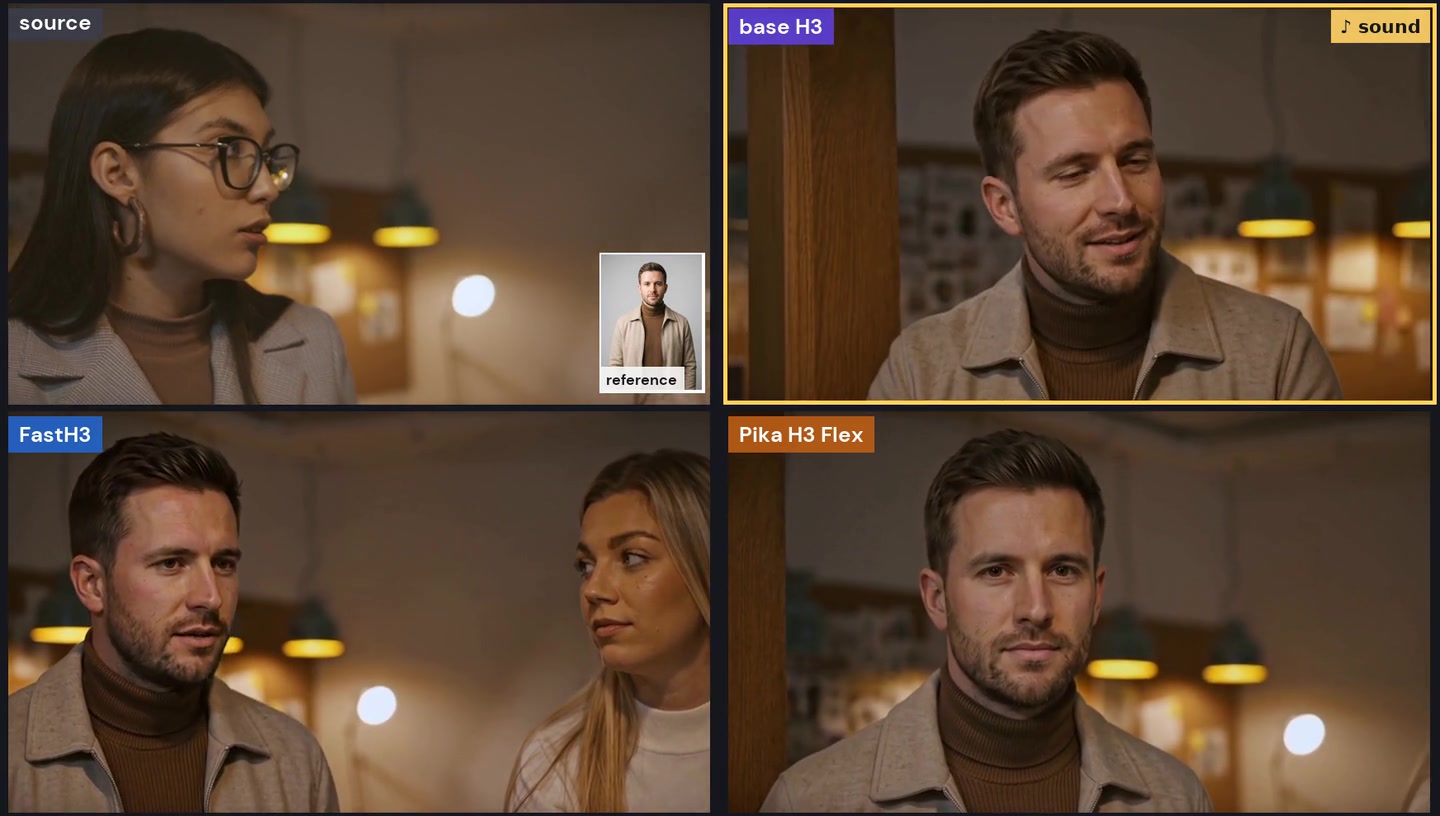
At 13 s: now the man from the reference
Prompt · base H3 and FastH3 · Picture 1 = inset
“The target video is an edited version of <Video 1>: the young woman with long dark hair and large glasses, in the shots where she appears is replaced by the person in <Picture 1>. Everything else in <Video 1> stays exactly as it is, frame by frame, with the same timing.”
Base H3 and Pika start with the original person in most clips. H3 seems to read the source video as context to continue from, not as frames to edit.
Swap · emotional close-up · 2 of 4
Crying man
Prompt · base H3 and FastH3 · Picture 1 = inset
“The target video is an edited version of <Video 1>: the young man with short dark hair in the black shirt is replaced by the person in <Picture 1>. Everything else in <Video 1> stays exactly as it is, frame by frame, with the same timing.”
base H3
fails
FastH3
works
Pika H3 Flex
fails
What to see
FastH3 swaps from the first frame and keeps the tears; base H3 and Pika swap late.
Swap · dance · 3 of 4
Solo dance at a neon wall
Prompt · base H3 and FastH3 · Picture 1 = inset
“The target video is an edited version of <Video 1>: the young woman with an afro in the orange top is replaced by the person in <Picture 1>. Everything else in <Video 1> stays exactly as it is, frame by frame, with the same timing.”
All three
partly
What to see
The person is swapped, but the dance is a different one: the motion is not kept.
Swap · two people touching · 4 of 4
Two women hugging
Prompt · base H3 and FastH3 · Picture 1 = inset
“The target video is an edited version of <Video 1>: the young woman with short brown hair and round glasses is replaced by the person in <Picture 1>. Everything else in <Video 1> stays exactly as it is, frame by frame, with the same timing.”
All three
fail
What to see
Close contact breaks the swap: no method makes a clean one.
Public data
Nothing public matches 15 s, 768p, with sound
Area
What exists
The gap
General editing
OpenVE-3M: 3M synthetic pairs, 720p, 8 edit types; older sets (Señorita-2M, Ditto-1M, InsViE-1M) are smaller in scope.
About 5 s at most, no sound, quality capped by the models that made the edits.
Object removal
VPData: 392K real clips with masks, no clean target. ROSE: rendered pairs with shadows and reflections.
No real paired video of the same scene with and without the object; ROSE is non-commercial.
Character swap
Phantom-Data and OpenS2V-5M: a reference image and a video of the same subject.
No full-body swap dataset; paired swaps would have to be made.
Benchmarks
OpenVE-Bench: 431 pairs in 8 types, the one recent papers report on.
None checks sound or goes to 15 s, the two places H3 failed most.
Public editing data is large but synthetic, short and silent. Licences: only ROSE states one (CC BY-NC 4.0, research only); check each set before use beyond research. From our dataset review, 03.11.